call us: +31203311214
call us: +31203311214

PST SDK
Powerful software tools for configuring, operating, and integrating PS-Tech optical trackers
PST SDK
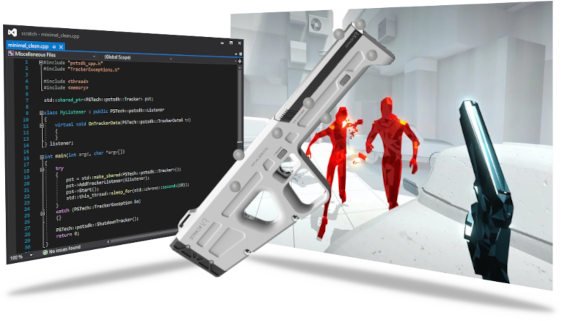
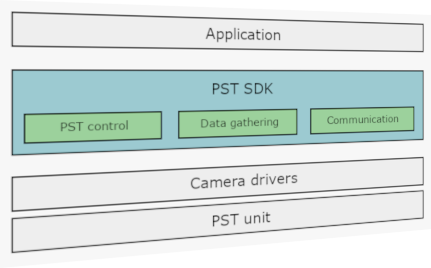
The PST SDK offers the best low-level integration of the PST optical tracking system. Without the need of any extra software you get full control of the PST unit into your own application. Get tracking results, change the frame rate, even receive raw camera images! All through a simple API, allowing you to get started in no-time using your favorite language.
Super-fast integration in your solution
The PST SDK enables the integration of full PST support into your application, offering high flexibility with minimum effort. You decide which features of the PST will be accessible in your application.
Because the PST SDK directly interfaces with the PST hardware, it offers the most direct and fastest interface to the PST.
#include "pstsdk_cpp.h"
#include "TrackerExceptions.h"
#include <thread>
#include <iostream>

class MyListener : public PSTech::pstsdk::Listener
{
    virtual void OnTrackerData(PSTech::pstsdk::TrackerData& td)
    {
        for(const auto& target : td.targetlist)
        {
            std::cout << target.name.c_str() << std::endl;
        }
    }
} listener;

int main(int argc, char *argv[])
{
    try
    {
        PSTech::pstsdk::Tracker pst;
        pst.AddTrackerListener(&listener);
        pst.Start();
        std::this_thread::sleep_for(std::chrono::seconds(10));
    }
    catch (PSTech::TrackerException &e)
    {}
    PSTech::pstsdk::Tracker::Shutdown();
    return 0;
}
using System;
using System.Threading;
using PSTech.Pstsdk;

public class Minimal
{
    static void OnTrackerData(TrackerData data, ErrorStatus status)
    {
        foreach(TargetPose pose in data.TargetPoseList)
        {
            Console.WriteLine(pose.Target.Name);
        }
    }

    static void Main(string[] args)
    {
        try
        {
            Tracker tracker = new Tracker();
            tracker.AddTrackerListener(OnTrackerData);
            tracker.StartTracker();
            Thread.Sleep(10000);
        }
        catch (Exception e)
        {}
        finally
        {
            Tracker.Shutdown();
        }
    }
}
#include "pstsdk_c.h"
#include <stdio.h>
#include <Windows.h>

void CheckErrorCode(EPstErrorStatus status)
{
    if (status != PST_ERROR_STATUS_OK)
    {
        pst_sdk_shutdown();
        exit(status);
    }
}

void OnTrackerData(const PstTrackerData* tracker_data, EPstErrorStatus status)
{
    for(int d = 0; d < tracker_data->number_of_targets; ++d)
    {
        printf("%s\n", tracker_data->targetlist[d].target.name);
    }
}

int main(int argc, char* argv[])
{
    PstTracker ctracker;
    CheckErrorCode(pst_tracker_init(&ctracker));
    CheckErrorCode(pst_tracker_add_tracker_listener(&ctracker, OnTrackerData));
    CheckErrorCode(pst_tracker_start(&ctracker));
    Sleep(10000);
    pst_tracker_destroy(&ctracker);
    return 0;
}
import context
import time
import sys
import pstech.pstsdk.tracker as pst
import pstech.pstsdk.errors as psterrors

def callback_function(tracker_data, status_message: int):
    for data in tracker_data:


def main():
    if(len(sys.argv) < 2):
        print("Please specify a full path to a camera configuration file")
        exit(0)

    try:
        with pst.Tracker("", "","", sys.argv[1]) as tracker:
            tracker.add_tracker_listener(callback_function)
            tracker.start()
            time.sleep(10)
    except psterrors.TrackerError as err:
        print(err.message)

if __name__ == "__main__":
    main()
<html>
<head>
<script src="https://ajax.googleapis.com/ajax/libs/jquery/3.5.1/jquery.min.js"></script>
<script>
var settings = {
  "async": true,
  "crossDomain": true,
  "url": "http://localhost:7278/PSTapi/Start",
  "method": "POST",
  "headers": {
    "Accept": "*/*"
  }
};

$.ajax(settings).done(function (response) {
  console.log(response);
});

var source = new EventSource('http://localhost:7278/PSTapi/StartTrackerDataStream');

source.onmessage = function(event) {
    var data = event.data;
    console.log(data);
};
</script>
</head>
</html>
Super-fast integration in your solution
The PST SDK enables the integration of full PST support into your application, offering high flexibility with minimum effort. You decide which features of the PST will be accessible in your application.
Because the PST SDK directly interfaces with the PST hardware, it offers the most direct and fastest interface to the PST.
class MyListener : public PSTech::pstsdk::Listener
{
    virtual void OnTrackerData(PSTech::pstsdk::TrackerData& td)
    {
        for (int d = 0; d < td.targetlist.size(); ++d)
        {
            auto& mat = td.targetlist[d].pose;
            std::cout << "Pose for " << td.targetlist[d].name.c_str() << "\n";
            for (int y = 0; y < 4; ++y)
            {
                for (int x = 0; x < 4; ++x)
                {
                    std::cout << mat[x + y * 4] << "\t";
                }
                std::cout << "\n";
            }
        }
    }
} listener;
static void OnTrackerData(TrackerData data, ErrorStatus status)
{
    for (int d = 0; d < data.TargetPoseList.Length; ++d)
    {
        var mat = data.TargetPoseList[d].PoseMatrix;
        Console.Write("Pose for " + data.TargetPoseList[d].Target.Name + "\n");
        for (int y = 0; y < 4; y++)
        {
            for (int x = 0; x < 4; x++)
            {
                Console.Write(mat[x + y * 4] + "\t");
            }
            Console.WriteLine();
        }
    }
}
void OnTrackerData(const PstTrackerData* tracker_data, EPstErrorStatus status)
{
    for (int d = 0; d < tracker_data->number_of_targets; ++d)
    {
        float* mat = tracker_data->targetlist[d].pose_matrix;
        printf("Pose for %s \n", tracker_data->targetlist[d].target.name);
        for (int y = 0; y < 4; ++y)
        {
            for (int x = 0; x < 4; ++x)
            {
                printf("%f \t", mat[x + y * 4]);
            }
            printf("\n");
        }
    }
}
def callback_function(tracker_data, status_message: int):
    for target_pose in tracker_data.targetlist:
        print("Pose for " + target_pose.name)
        matrix = target_pose.pose
        for y in range(4):
            for x in range(4):
                print(str(matrix[x + y * 4]), end="\t")
            print("")
        print("\n")
<script>
document.write('');
var source = new EventSource('http://localhost:7278/PSTapi/StartTrackerDataStream');
source.onmessage = function(event) {
    var data = JSON.parse(event.data);
    $('#data').empty();
    data["TrackerData"]["TargetPoses"].forEach(function(item, index) {
        $('#data').append(item["TargetPose"]["name"] + '
');
        var array = item["TargetPose"]["TransformationMatrix"];
        for(var y = 0; y < 4; y++) {
            for(var x = 0; x < 4; x++) {
                $('#data').append(Number.parseFloat(array[x + y * 4]).toFixed(10) + ' ');
            }
            $('#data').append('
');
        }
    });
};
</script>
Listen to the data
Handling tracking data is simple as well. This example shows how to implement the Listener callback such that it prints out the transformation matrix for each detected tracking target, every recorded frame.
API's
This is all it takes to start integrating the PST into your application. To learn more about the different APIs offered by the PST SDK, please follow the links below to see the full API documentation for your favorite language.




If you are looking for information on the legacy Classic SDK, it can be found here.